Nodes - Computer Node (Worker) - Control Plane (Master)
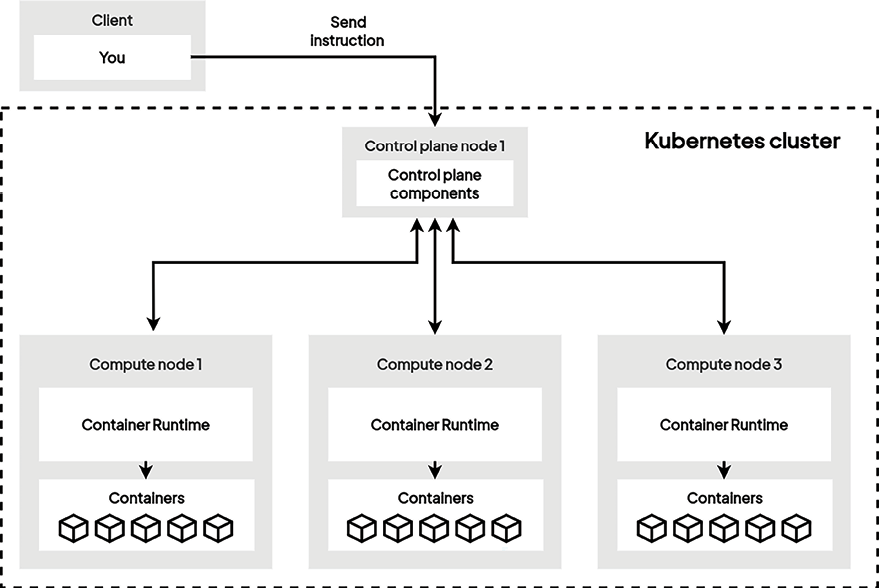
Communication Showcase:
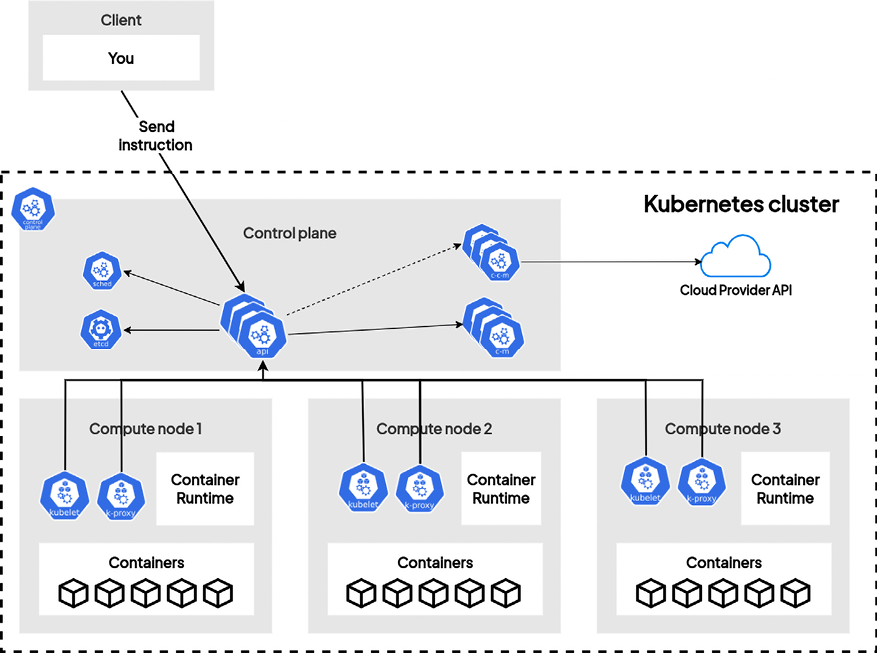
Control Plane Components
Responsible for maintaining the state of the cluster. They should be installed on a control plane node. As an administrator, when you interact with Kubernetes, you interact with the control plane components.
kube-apiserveretcdkube-schedulerkube-controller-managercloud-controller-manager
Compute node components
Responsible for interacting with the container runtime in order to launch containers according to the instructions they receive from the control plane components.
kubeletkube-proxyContainer runtime
Add-on components
Add-ons utilize Kubernetes resources such as DaemonSet, Deployment, and others to implement cluster features. These features operate at the cluster level, resources for add-ons that are namespaced are located within the kube-system namespace. Common add-ons
DNSWeb UI (dashboard)Container resource monitoringCluster-level loggingNetwork plugins
Control plane in managed Kubernetes clusters
cloud services like Amazon EKS, Google GKE, and similar offerings handle the installation and configuration of most Kubernetes control plane components.
They provide access to a Kubernetes endpoint, or optionally, the kube-apiserver endpoint, without exposing intricate details about the underlying machines or provisioned load balancers.
This holds true for components such as kube-scheduler, kube-controller-manager, etcd, and others.
The Control Plane Components
Different control plane components and their responsibilities.
kube-apiserver
- Representational State Transfer (REST) API
- Which exposes all the Kubernetes features
- Interact with Kubernetes by calling this REST API through the
kubectlcommand-line tool, direct API calls, or the Kubernetes dashboard (Web UI) utilities - Serves as the sole entry point for all operations directed to the orchestrator
- Accessible by employing different methods of the HTTP protocol like
GET,POST,PUT,PATCH, andDELETE
Data Store
REST APIs employ a datastore to manage the state of objects or resources.
Kubernetes uses etcd to store state.
The etcd is an open source distributed key-value store used to hold and manage the critical information that distributed systems need to keep running.
Doesnt matter if its local, on the cloud, or on-premises. It is also stateless; it keeps the state of the resources by relying on a database engine called etcd.
Database engine usage: - Utilizes full-featured database engines like MariaDB or PostgreSQL. - Delegating storage to an external engine makes the API stateless and horizontally scalable.
Kube-apiserver Interaction
We interact with Kubernetes via the command-line utility named kubectl, which is the HTTP client that is officially supported as part of the Kubernetes project. When you download kube-apiserver, you’ll end up with a Go-compiled binary that is ready to be executed on any Linux machine.
Theresa a set of resources for us that are directly bundled within the binary. So, do expect the resources in kube-apiserver related to container management, networking, and computinsg in general.
A few of these resources are as follows:
PodReplicaSetPersistentVolumeNetworkPolicyDeployment- https://kubernetes.io/docs/reference/kubernetes-api/ (Full List)
IMPORTANT TO REMEMBER Kubernetes makes use of a resource called a Pod to manage the containers. For now, you can think of pods as though they were containers.
After the Kubernetes objects are stored on the etcd database, other Kubernetes components will convert these objects into raw container instructions.
Kube-apiserver manages the cluster’s state but also incorporates numerous mechanisms for authentication, authorization, and HTTP response formatting.
Running Kube-apiserver
Two ways to run kube-apiserver (and other components), as follows:
- By running kube-apiserver as a container image
- By downloading and installing kube-apiserver and running it using a systemd unit file
Depending on the Kubernetes cluster deployment mechanisms, kube-apiserver and other components will be configured as containers by downloading the appropriate images from the container registry (e.g., registry.k8s.io).
kube-apiserver should be run on the control plane node(s) as it is part of the control plane. Ensure that the kube-apiserver component is installed on a robust machine solely dedicated to the control plane operations. This component is crucial, and if it becomes inaccessible, your containers will persist but lose connectivity with Kubernetes.
Other Kubernetes components from all cluster nodes constantly send HTTP requests to kube-apiserver to understand the state of the cluster or to update it.
And the more compute nodes you have, the more HTTP requests will be issued against kube-apiserver. That’s why kube-apiserver should be independently scaled as the cluster itself scales out. You can scale it horizontally by hosting it on a group of machines that are behind a load balancer such as an HTTP API.
Load Balancer
                         |
        +----------------+----------------+
        |                |                |
   Machine 1         Machine 2       Machine 3
   kube-apiserver    kube-apiserver  kube-apiserver
   (instance 1)      (instance 2)    (instance 3)
        |                |                |
        +----------------+----------------+
                         |
                    etcd cluster
              (shared data store)
Understanding The etcd Datastore
To store the state of the cluster status and details, kube-apiserver uses etcd, an open source, distributed key-value store.
etcd is not a part of the Kubernetes project but a separate project that is maintained by the etcd-io community.
Some distributions like k3s leverage alternatives by default, such as SQLite or even external databases like MySQL or PostgreSQL
When you call kube-apiserver, each time you implement a read or write operation by calling the Kubernetes API, you will read or write data from or to etcd.
Let’s zoom into what is inside the master node now:
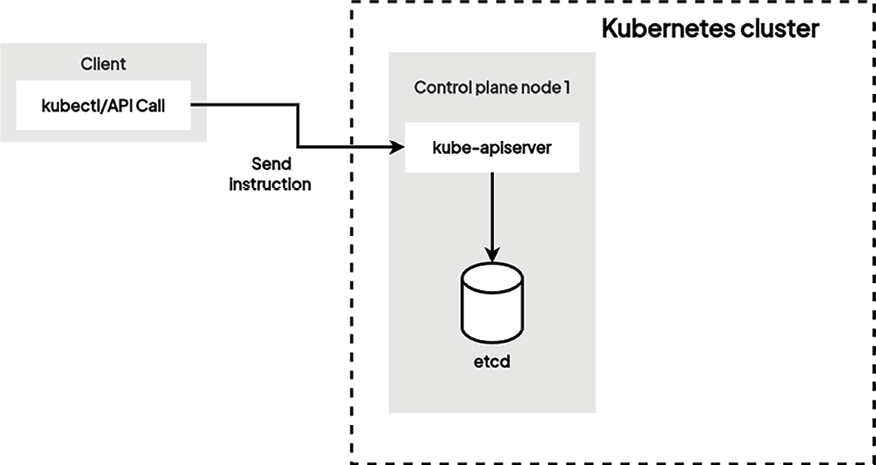
kube-apiserver is the only component that can read or write from and to etcd
If you lose the data in etcd, your Kubernetes cluster won’t work anymore. It’s even more crucial than kube-apiserver. If kube-apiserver crashes, you can restart it. But if etcd data is lost or messed up without a backup, your Kubernetes cluster is done for.
Every component has to go through kube-apiserver to read or write in etcd. This is because, from a technical point of view, kubectl authenticates itself against kube-apiserver through a TLS client certificate that only kube-apiserver has.
etcd is also designed as a REST API. By default, it listens to port 2379.
Let’s explore a simple kubectl command, as follows:
$ kubectl run nginx --restart Never --image nginx
Kubectltool will forge an HTTPPOSTrequest that will be executed against thekube-apiservercomponent specified in thekubeconfigfile.Kube-apiserverwill write a new entry inetcd, which will be persistently stored on disk.- At that point, the state of Kubernetes changes: it will then be the responsibility of the other Kubernetes components to reconcile the actual state of the cluster to the desired state of the cluster (that is, the one in
etcd). etcdis not in-memory storage. If you reboot your machine, you do not lose the data because it is kept on disk.
Where do you run etcd?
- In a self-managed Kubernetes setup, you can operate
etcdeither within a container or as part of asystemdunit file. etcdcan naturally expand horizontally by distributing its dataset across several servers, making it an independent clustering solution.
Deployment Options:
etcdcan be deployed together withkube-apiserver(and other control plane components) on the control plane nodes – this is the default and simple setupusing static manifests- You can configure to use a dedicated
etcdcluster – this is a more complex approach but more reliable if your environment is demanding for such reliability.
The details about single-node or multi-node dedicated etcd clusters can be found in the official Kubernetes documentation at https://kubernetes.io/docs/tasks/administer-cluster/configure-upgrade-etcd/.
Learning more about etcd
If you are interested in learning how etcd works and want to play with the etcd dataset, there is a free playground available online. Visit http://play.etcd.io/play and learn how to manage etcd clusters and data inside.
How etcd Distributes Data
It's NOT about shared storage. etcd uses data replication, not shared disks. Each etcd node maintains its own complete copy of the entire dataset on its local disk.
When you have 3 etcd nodes:
- Node 1 has the full dataset on its disk
- Node 2 has the full dataset on its disk
- Node 3 has the full dataset on its disk
How It Actually Works
etcd uses the Raft consensus algorithm to keep these copies synchronized:
- Write requests go to the leader
- Leader proposes the change to followers
- Once majority (quorum) acknowledges, the write is committed
- All nodes eventually have the identical data
-
There's always one elected leader that:
-
Coordinates all write operations
- Manages the consensus protocol
- Handles the log replication
kube-scheduler
Responsible for electing a worker node out of those available to run a newly created pod. Upon creation, pods are unscheduled, indicating that no worker node has been designated for their execution.
An unscheduled pod is recorded in etcd without any assigned worker node. Consequently, no active kubelet will be informed of the need to launch this pod, leading to the non-execution of any container outlined in the pod specification.
The pod object, as it is stored in etcd, has a property called nodeName. As the name suggests, this property should contain the name of the worker node that will host the pod.
When this property is set, we say that the pod has been scheduled; otherwise, the pod is pending for schedule.
Process:
1. kube-scheduler queries kube-apiserver at regular intervals in order to list the pods that have not been scheduled or with an empty nodeName property. Once it finds such pods, it will execute an algorithm to elect a worker node.
2. Then, it will update the nodeName property in the pod by issuing an HTTP request to the kube-apiserver component.
3. While electing a worker node, the kube-scheduler component will take into account some configuration values that you can pass:
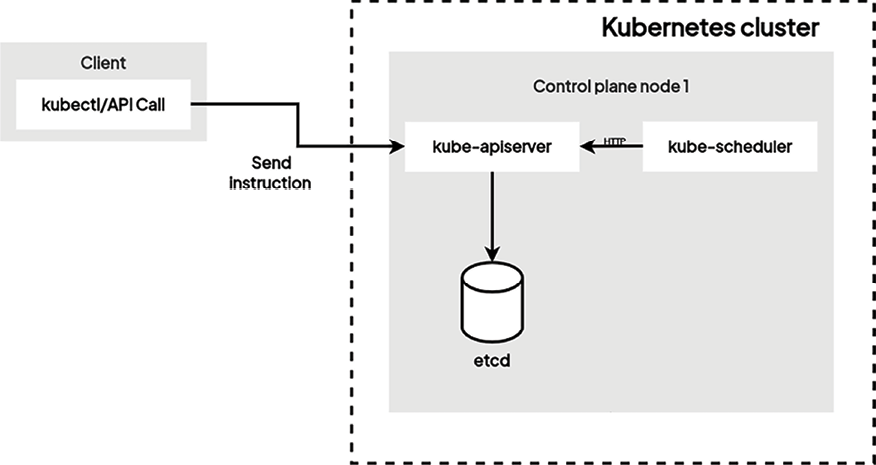
kube-scheduler component will take into account some configuration values that you can pass optionally. By using these configurations, you can precisely control how the kube-scheduler component will elect a worker node.
Here are some of the features to bear in mind when scheduling pods on your preferred node:
- Node selector
- Node affinity and anti-affinity
- Taint and toleration
There are also advanced techniques for scheduling that will completely bypass the
kube-schedulercomponent.
Where do you install kube-scheduler?
You can choose to install kube-scheduler on a dedicated machine or the same machine as kube-apiserver. It’s a short process and won’t consume many resources, but there are some things to pay attention to.
kube-scheduler component should be highly available. That’s why you should install it on more than one machine. If your cluster does not have a working kube-scheduler component, new pods won’t be scheduled, and the result will be a lot of pending pods.
note that if no kube-scheduler component is present, it won’t have an impact on the already scheduled pods.
kube-controller-manager
kube-controller-manager is a substantial single binary that encompasses various functionalities, Controller
Component that runs what we call the reconciliation loop.
kube-controller-manager tries to maintain the actual state of the cluster with the one described in etcd so that there are no differences between the states.
In certain instances, the actual state of the cluster may deviate from the desired state stored in etcd. This discrepancy can result from pod failures or other factors.
The kube-controller-manager component plays a crucial role in reconciling the actual state with the desired state.
Think of the replication controllers operating within the kube-controller-manager.
Kubernetes allows you to specify and maintain a specific number of pods across different compute nodes.
If, for any reason, the actual number of pods varies from the specified count, the replication controller initiates requests to the kube-apiserver component. This aims to recreate a new pod in etcd, thereby replacing the failed one on a compute node.
A few controllers that are part of kube-controller-manager:
- Node Controller: Handles the life cycle of nodes, overseeing their addition, removal, and updates within the cluster
- Replication Controller: Ensures that the specified number of replicas for a pod specification is consistently maintained
- Endpoints Controller: Populates the endpoints objects for services, reflecting the current pods available for each service
- Service Account Controller: Oversees the management of ServiceAccounts within namespaces, ensuring the presence of a ServiceAccount named default in each currently active namespace
- Namespace Controller: Manages the lifecycle of namespaces, encompassing creation, deletion, and isolation
- Deployment Controller: Manages the lifecycle of deployments, ensuring that the desired pod count for each deployment is maintained
- StatefulSet Controller: Manages the lifecycle of stateful sets, preserving the desired replica count, pod order, and identity
- DaemonSet Controller: Manages the lifecycle of daemon sets, guaranteeing that a copy of the daemon pod is active on each cluster node
- Job Controller: Manages the lifecycle of jobs, ensuring the specified pod count for each job is maintained until job completion
- Horizontal Pod Autoscaler (HPA) Controller: Dynamically scales the number of replicas for a deployment or stateful set based on resource utilization or other metrics
- Pod Garbage Collector: Removes pods no longer under the control of an owner, such as a replication controller or deployment
Where do you run cloud-controller-manager?
The cloud-controller-manager component can run as a container or a systemd service similar to kube-apiserver on the control plane nodes.
The compute node components
Previous Understandings:
-
Container Engines: such as Docker, Podman and CRI-O(Kubernetes) play a crucial role in managing microservices. Containers are lightweight units that share the host machine’s Linux kernel. This makes them much faster to start and stop than VMs. Software platform designed to oversee the creation, execution, and lifecycle of containers
-
Container Runtimes: Software component responsible for the creation, execution, and administration of containers in the backend when instructed by a container engine or container orchestrator. Furnishes essential functionality for container operation, encompassing tasks such as image loading, container creation, resource allocation, and container lifecycle management.
Containerd,runc,dockerd, and Mirantis Container Runtime -
Kublet
-
Kube proxy
IMPORTANT Note
Container runtime (low-level) is the core engine responsible for executing container images, managing their lifecycles (start, stop, pause), and interacting with the underlying operating system.
Container engine (high-level) builds upon the container runtime, offering additional features like image building, registries, and management tools
low-level runtimes handle container execution, while high-level engines add a layer of management and user-friendliness.
Kubernetes is not limited to Docker now; it can utilize several other container runtimes such as containerd, CRI-O (with runc).
containerd and CRI-O specialize in container runtime functionality, making them more lightweight and potentially more secure compared to Docker’s broader feature set. This focus also allows for seamless integration with container orchestration platforms like Kubernetes.
Kubernetes is actively moving away from Docker as the default runtime.
Kubernetes now encourages the use of runtimes adhering to the Container Runtime Interface (CRI).
By choosing containerd or CRI-O, you ensure a more native and efficient integration with your Kubernetes environment.
CRI-O, in particular, is designed as a lightweight container runtime specifically for Kubernetes. It closely follows Kubernetes release cycles with respect to its minor versions
Container Runtime Interface
Kubernetes employs a container runtime to execute containers within Pods. Kubernetes utilizes the CRI to establish communication with the selected container runtime.
CRI serves as a plugin interface, empowering the kubelet to seamlessly integrate with a diverse range of container runtimes.
Which enables the selection of an optimal container runtime tailored to specific environmental requirements, such as containerd, Docker Engine, or CRI-O.
Within the CRI, a set of defined APIs allows the kubelet to engage with the container runtime efficiently. These APIs cover essential operations like creating, starting, stopping, and deleting containers, along with managing pod sandboxes and networking.
The following table shows the known endpoints for Linux machines:
| Runtime | Path to Unix domain socket |
|---|---|
containerd |
unix:///var/run/containerd/containerd.sock |
| CRI-O | unix:///var/run/crio/crio.sock |
Docker Engine (using cri-dockerd) |
unix:///var/run/cri-dockerd.sock |
| Docs - https://kubernetes.io/docs/setup/production-environment/tools/kubeadm/install-kubeadm |
Kubernetes and Docker
In Kubernetes releases prior to v1.24, there was a direct integration with Docker Engine facilitated by a component called dockershim. This specific integration has been discontinued. The deprecation of Docker as the underlying runtime is underway, and Kubernetes is now encouraging the use of runtimes aligned with the CRI designed for Kubernetes.
Despite these changes, Docker-produced images will persistently function in your cluster with any runtime, ensuring compatibility as it has been previously. Thus any Linux machine running containerd can be used as a base on which to build a Kubernetes worker node.
Open Container Initiative
Open Container Initiative (OCI) is an open-source initiative that defines standards for container images, containers, container runtimes, and container registries.
- aims to establish interoperability and compatibility across container systems, ensuring consistent container execution in diverse environments.
- Additionally, the CRI collaborates with OCI, providing a standardized interface for the
kubeletto communicate with container runtimes. - Defines standards for container images and runtimes supported by the CRI, fostering efficient container management and deployment in Kubernetes.
Container RuntimeClass
Kubernetes RuntimeClass allows you to define and assign different container runtime configurations to Pods. - Enables balancing performance and security for your applications. - Basically high-security workloads scheduled with a hardware virtualization runtime for stronger isolation, even if it means slightly slower performance. - Allows you use the same runtime with different settings for specific Pods. To leverage this, you’ll need to configure the CRI on your nodes (installation varies) and create corresponding RuntimeClass resources within Kubernetes.
kubelet
The most important component of the compute node since it is the one that will interact with the local container runtime installed on the compute node.
- Functions solely as a system daemon and cannot operate within a container.
- Its execution is mandatory directly on the host system, often facilitated through
systemd. - This distinguishes the
kubeletfrom other Kubernetes components, emphasizing its exclusive requirement to run on the host machine.
When the kubelet gets started, by default, it reads a configuration file located at /etc/kubernetes/kubelet.conf.
This configuration specifies two values that are really important for the kubelet to work:
- The endpoint of the kube-apiserver component
- The local container runtime Unix socket
Once the compute node has joined the cluster, the kubelet will act as a bridge between kube-apiserver and the local container runtime.
kubelet is constantly running HTTP requests against kube-apiserver to retrieve information about pods it has to launch.
Approach:
- By default, every 20 seconds, the kubelet runs a GET request against the kube-apiserver component to list the pods created on etcd that are destined to it.
- Once it receives a pod specification in the body of an HTTP response from kube-apiserver, it can convert this into a container specification that will be executed against the specified UNIX socket. The result is the creation of your containers on your compute node using the local container runtime (e.g., containerd).
The polling mechanisms, called watch mechanisms in Kubernetes terminology, are precisely to define how Kubernetes proceeds to run and delete containers against your worker nodes at scale. There are two things to pay attention to here:
- The
kubeletandkube-apiservermust be able to communicate with each other through HTTP. That’s why HTTPS port6443must be opened between the compute and control plane nodes. - As they are running on the same machine, the kubelet, CRI, and container runtimes are interfaced through the usage of UNIX sockets.
Each worker node in the Kubernetes cluster needs its own kubelet, causing heightened HTTP polling against kube-apiserver with additional nodes.
n larger clusters, particularly those with hundreds of machines, this increased activity can adversely affect kube-apiserver’s performance and potentially lead to a situation that may impact API availability. Efficient scaling is essential to ensure the high availability of the kube-apiserver and other control plane components.
Extra Note:
- You can completely bypass Kubernetes and create containers on your worker nodes without having to use the kubelet, and the sole job of the kubelet is that its local container runtime reflects the configuration that is stored in etcd.
- if you create containers manually on a worker node, the kubelet won’t be able to manage it.
- However, exposing the container runtime socket to containerized workloads is a security risk. It bypasses Kubernetes’ security mechanisms and is a common target for attackers.
- Key security practice is to prevent containers from mounting this socket, safeguarding your Kubernetes cluster.
The container engine running on the worker node has no clue that it is managed by Kubernetes through a local kubelet agent. A compute node is nothing more than a Linux machine running a container runtime with a kubelet agent installed next to it, executing container management instructions.
The kube-proxy component
Kubernetes has tons of mechanics when it comes to exposing pods to the outside world or exposing pods to one another in the Kubernetes cluster.
These mechanics are implemented at the kube-proxy level; Each worker node requires an instance of a running kube-proxy so that the pods running on them are accessible.
The kube-proxy component also communicates with the kube-apiserver component.
Several other sub-components or extensions operate at the compute node level, such as cAdvisor or Container Network Interface (CNI).
Exploring the kubectl command-line tool and YAML syntax
kubectl is the official command-line tool used to manage the Kubernetes platform. This is an HTTP client that is fully optimized to interact with Kubernetes and allows you to issue commands to your Kubernetes cluster.
Installing the kubectl command-line tool
You need to ensure that your kubectl client version stays within one minor version of your Kubernetes cluster for optimal compatibility. This means a v1.30 kubectl can manage clusters at v1.29, v1.30, and v1.31. Sticking to the latest compatible version helps avoid potential issues.
You can also install kubectl using the native package manager, such as apt-get, yum, Zypper, brew (macOS), or Chocolatey (Windows). Refer to the documentation
The role of kubectl
Since kube-apiserver is nothing more than an HTTP API, any HTTP client will work to interact with a Kubernetes cluster.
When you call kubectl, it reads the parameters you pass to it and, based on them, will create and issue HTTP requests to the kube-apiserver component of your Kubernetes cluster:
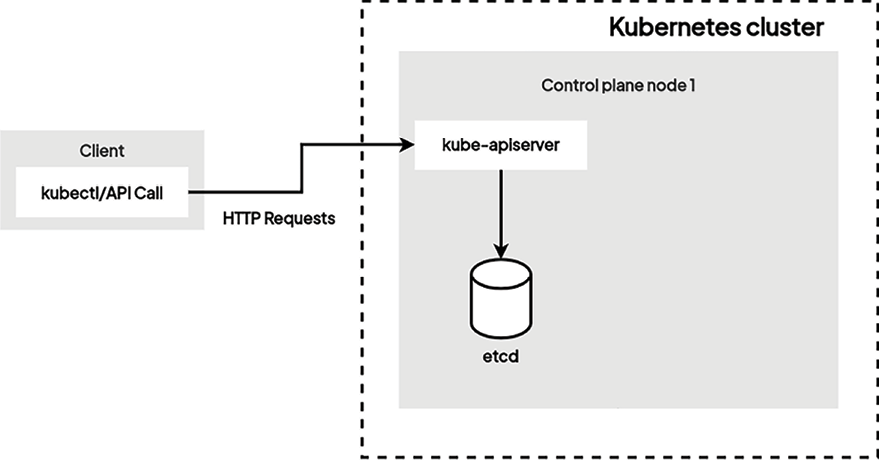
Once the kube-apiserver component receives a valid HTTP request coming from you, it will read or update the state of the cluster in etcd based on the request you submitted. If it’s a write operation – for example, to update the image of a running container – kube-apiserver will update the state of the cluster in etcd.
Then, the components running on the worker node where said container is being hosted will issue the proper container management commands in which to launch a new container based on the new image. This is so that the actual state of the container reflects what’s in etcd.
mastery of Kubernetes is largely based on your knowledge of the kubectl commands. To be effective with Kubernetes, you must master the Kubernetes API and details as much as possible. You won’t have to interact with any other components than kube-apiserver and the kubectl command-line tool that allows you to call it.
How does kubectl work?
When you call the kubectl command, it will try to read a configuration file called kubeconfig from the default location $HOME/.kube/config. The kubeconfig file should contain the following information so that kubectl can use it and authenticate against kube-apiserver:
- The URL of the
kube-apiserverendpoint and the port - The user account
- Client certificates (if any) used to authenticate against
kube-apiserver - User-to-cluster mapping, known as context
NB - It is also possible to pass the details (such as cluster information, user authentication details, etc.) to the kubectl command as arguments but this is not a handy method when you have an environment with multiple clusters to manage.
A typical kubeconfig file and details are depicted in the following diagram:
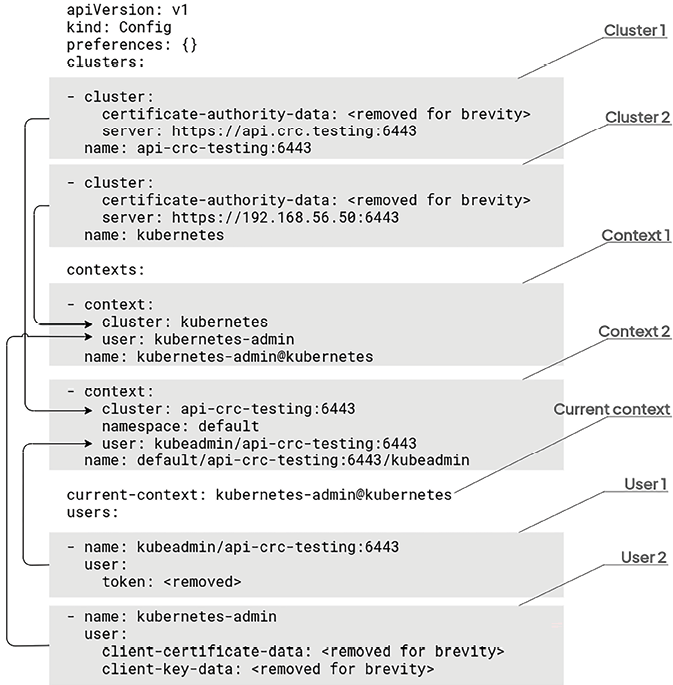
In the preceding diagram, there are multiple clusters, users, and contexts configured:
-
Clusters: This section defines the Kubernetes clusters you can interact with. It contains information like the server address, API version, and certificate authority details for each cluster, allowing
kubectlto connect and send commands to them. -
Users: This section stores your credentials for accessing the Kubernetes clusters. It typically includes a username and a secret (like a token or client certificate) used for authentication with the API server.
kubeconfigfiles can also reference certificates in theusersection to securely authenticate users with the Kubernetes API server. This two-way verification ensures that only authorized users with valid certificates can access the cluster, preventing unauthorized access and potential security breaches.
- Contexts: This section acts as a bridge between clusters and users. Each context references a specific cluster and a specific user within that cluster. By choosing a context, you define which cluster and user credentials kubectl will use for subsequent commands.
With multiple clusters, users, and contexts configured inside the kubeconfig file, it is easy to switch to different Kubernetes clusters with different user credentials.
The path of kubeconfig can be overridden on your system by setting an environment variable, called KUBECONFIG, or by using the --kubeconfig parameter when calling kubectl:
$ export KUBECONFIG=”/custom/path/.kube/config” $ kubectl --kubeconfig=”/custom/path/.kube/config”
The kubectl command-line tool will look for a kubeconfig file in which to load its configuration in the following order:
- First, it checks whether the
--kubeconfigparameter has been passed and loads the config file. - At that point, if no
kubeconfigfile is found,kubectllooks for theKUBECONFIGenvironment variable. - Ultimately, it falls back to the default one in
$HOME/.kube/config.
To view the config file currently used by your local kubectl installation, you can run this command:
$ kubectl config view
the HTTP request is sent to kube-apiserver, which produces an HTTP response that kubectl will reformat in a human-readable format and output to your Terminal.
The following command is probably one that you’ll type almost every day when working with Kubernetes:
$ kubectl get pods
This command lists the Pods. Essentially, it will issue a GET request to kube-apiserver to retrieve the list of containers (Pods) on your cluster. Internally, kubectl associates the Pods parameter passed to the command to the /api/v1/pods URL path, which is the path that kube-apiserver uses to expose the pod resource.
Here is another command:
$ kubectl run nginx --restart Never --image nginx
trickier because run is not an HTTP method. This command will issue a POST request against the kube-apiserver component, which will result in the creation of a container called nginx, based on the nginx image hosted on the container registry (e.g., Docker Hub or quay.io).
In fact, this command won’t create a container but a Pod.
kubectl auto-completion
kubectl offers a built-in auto-completion feature for various shells, saving you precious time and frustration. kubectl supports autocompletion for popular shells like:
- Bash
- Zsh
- Fish
- PowerShell
To enable the autocompletion in Linux Bash, as an example:
# Install Bash Completion (if needed)
$ sudo yum install bash-completion  # For RPM-based systems
$ sudo apt install bash-completion  # For Debian/Ubuntu-based systems
# Add the source line to your shell configuration
$ echo ‘source <(kubectl completion bash)’ >>~/.bashrc